
Contact Us

Hosting & Performance
Why Is My Website Slow? Common Causes (With Nepal Hosting Examples)
September 22, 2026

“Why is my website slow” is one of the most searched frustrations in web hosting and one of the least satisfyingly answered, because most guides give generic advice (“compress your images!”) without explaining how to actually find your specific cause.
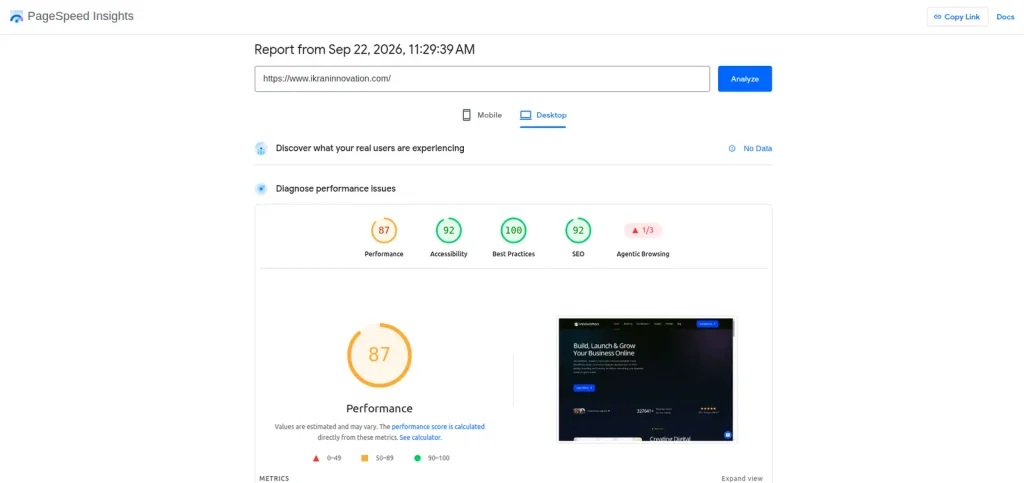
We recently went through this exact process on our own site, so instead of the usual generic checklist, this walks through the real slow website causes we’ve seen, with a real example of what we found and fixed.
Start With a Real Diagnosis, Not Guesswork
Before changing anything, run your site through Google PageSpeed Insights (pagespeed.web.dev). It gives you an actual score (0-100) plus a breakdown of exactly what’s slowing you down – images, scripts, server response time, layout shifts. Guessing which fix to try first wastes time; the report tells you directly.
The Most Common Causes, Ranked by How Often We See Them
1. A Single Heavy or Broken Script
This is the one people miss most often, and it can be the single biggest cause even when everything else on the page looks fine. On our own site, we found one third-party animation script responsible for over 25 seconds of processing time on every single page load while every other part of the site was healthy. Removing that one script alone took our performance score from 51 to 85.
How to check: In PageSpeed Insights, look at the “3rd parties” and “Reduce JavaScript execution time” sections, they list exactly which script is using how much processing time. If one item dominates the list, that’s usually your real problem, not a dozen small issues.
2. Unoptimized Images
Large, uncompressed images – especially ones uploaded at full camera/screenshot resolution instead of resized for the web — are consistently one of the top causes of slow load times. This is especially common on sites that reuse the same stock or testimonial photo across many sections without compressing it once.
Fix: Use an image compression tool or plugin (ShortPixel, Imagify for WordPress) and convert images to WebP format, sized to their actual display width rather than the original upload size.
3. Weak or Oversold Hosting
This is where “Nepal hosting” specifically matters. A lot of small businesses in Nepal start on very cheap, shared hosting plans that pack many websites onto the same server resources. That works fine at low traffic, but response times degrade quickly once a plan is oversold or your site’s needs outgrow it. If your server response time itself (not images or scripts) is the flagged issue in PageSpeed Insights, the plan you’re on – not your website’s code – may be the actual bottleneck.
Fix: Check your hosting plan’s actual resource allocation, and consider moving to a cloud or VPS-based plan if you’re on the cheapest shared tier and traffic has grown since you signed up.
4. No Caching or CDN
Without caching, your server rebuilds each page from scratch on every single visit – including for returning visitors who’ve already loaded it before. A caching plugin (like WP Rocket or WP Super Cache for WordPress) stores a ready-to-serve version of your pages, and a CDN (Cloudflare is a solid free starting point) serves your content from a location physically closer to each visitor, which matters more than people expect for a site with visitors both inside and outside Nepal.

5. Render-Blocking Fonts and CSS
If your text is invisible for a moment while custom fonts load, or your page visibly “jumps” as styles finish loading, that’s usually a font-loading or CSS-loading issue. This won’t tank your score as dramatically as a broken script, but it affects the user’s perceived speed – the page might technically load fast but feel slow because of visible flashes and shifts.
Fix: Make sure fonts use font-display: swap, and check whether your page builder has a “combine CSS/JS” setting to reduce how many separate files the browser has to load before rendering.
Why This Matters Beyond User Annoyance
Improving website speed in Nepal isn’t just about frustrated visitors – it actively hurts your search rankings too.A slow website doesn’t just frustrate visitors – it actively hurts your search rankings. Google factors page speed into how it ranks sites, and a site that takes too long to load will also see more visitors leave before it even finishes rendering, which shows up as a bad signal too. Speed isn’t a nice-to-have polish item – it’s tied directly to both traffic and conversions.
Slow Website Causes
How to Actually Find Your Cause
Rather than trying every fix on this list at once, work through it in this order:
- Run PageSpeed Insights and note your score
- Check “3rd parties” and JavaScript execution time first – look for one dominant script
- Check “Improve image delivery” for image-related savings
- If server response time is flagged specifically, investigate your hosting plan
- Fix one thing, re-test, and confirm the score actually moved before tackling the next item
This order matters because fixing five small things can sometimes move your score less than fixing one big one as we found with our own site.

Frequently Asked Questions
Why is my website slow even though I compressed my images?
Images are one common cause, but not the only one – a heavy script, weak hosting, or missing caching can all keep a site slow even with perfectly optimized images. Run a full PageSpeed Insights check rather than assuming one fix solves everything.
Does hosting location matter for a Nepal-based website?
Yes. If your hosting server is physically far from most of your visitors, that adds real load time. A CDN helps offset this even if your primary server isn’t in the region your visitors are in.
How much does website speed actually affect SEO?
Google has confirmed page speed is a ranking factor, and slow-loading pages also tend to have higher bounce rates, which compounds the negative signal further.
How can I improve website speed in Nepal specifically?
Start with a PageSpeed Insights diagnosis rather than guessing – the fix (script, images, or hosting plan) depends entirely on what’s actually flagged, and local hosting quality plays a bigger role here than in markets with more mature infrastructure.
What’s a good website speed Nepal businesses should aim for?
As a general benchmark, aim for a PageSpeed score above 90 and a load time under 2-3 seconds. Given that hosting infrastructure and network conditions can vary more here than in some markets, treat these as targets to work toward rather than a hard pass/fail line – steady improvement matters more than hitting an exact number overnight.
Not sure what’s actually slowing your site down? Ikran Innovation offers a full website speed audit as part of our hosting and development services – we’ll find the real bottleneck instead of guessing.